1. Open your video
Choose a browser-supported video file from your phone or computer. You can also drop it onto the upload area.
Play local 180°, 360°, SBS and top-bottom VR videos in your browser. Free and private—no upload, account or install.
WatchVR maps a flat SBS-looking video into an interactive VR viewport with playback controls, projection overrides, and local-only file handling.
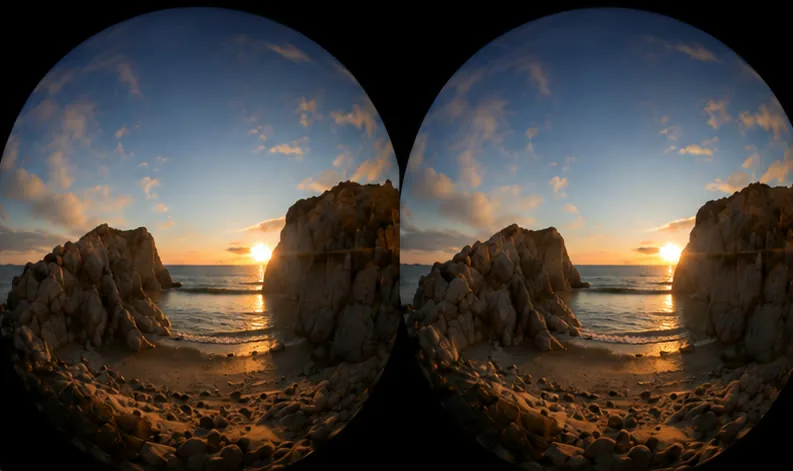

WatchVR maps each hemisphere of your SBS VR file to your viewport, delivering an undistorted experience right in your browser.
Browser-based VR playback
WatchVR turns a flat-looking VR video file into an interactive 180° or 360° view. Open a file from your device, choose the projection and layout, then drag to look around. Playback happens in the browser, so you can preview VR footage without first transferring it to a server or installing a desktop app.
Learn how to watch VR videos without a headsetChoose a browser-supported video file from your phone or computer. You can also drop it onto the upload area.
Use 180° or 360° projection with mono, SBS/LR, top-bottom or front-back layout controls.
Drag to look around, seek, change playback speed, zoom, and tune brightness, contrast and sharpness.
The online VR video player supports common immersive layouts: side-by-side (SBS or left-right), top-bottom (TB or over-under), mono and front-back. Switch between 180-degree and 360-degree projection when a filename is not detected correctly. Actual file playback depends on the video codecs your browser supports.
Your selected video stays on your device. WatchVR reads the local file through the browser and renders the VR view locally; it does not upload the video to our servers. No registration is required. See how local VR playback works or read the privacy details.
Yes. WatchVR opens the video from your device and processes it locally in your browser. The video file is not uploaded to WatchVR.
WatchVR supports mono, side-by-side (SBS or LR), top-bottom (TB or OU), and front-back layouts with 180-degree and 360-degree projection controls.
No. WatchVR runs in a compatible web browser and does not require an app installation or an account.
Yes. WatchVR displays an interactive VR view on a regular desktop or mobile screen, where you can drag or swipe to look around and adjust the projection and layout.